How Database stores Tables in HDD and SSD?
- Rohit Sharma

- Sep 18, 2021
- 7 min read
Hello Readers,
Hope you are all doing well!
Today I m here with another interesting topic. As we all store data in the tables but how exactly did tables data got stored internally? We will explore both famous storage drives HDD and SSD!
Let's start!
1)HDD (Hard Disk Drive)
HDD is mainly composed of platter, sectors, tracks, and blocks. There can be multiple platters and each platter consists of sectors and each sector consists of multiple blocks.

The above image gives us a reference about how the HDD components look likes.
Let's move forward and see how the tables inside the database store the data.
Let's take a table named numbers_table which has one attribute.
				numbers_table
		                number(integer)
Let's insert a value with our beautiful insert query
insert into numbers_table (number) values (1);Let's see what happened internally in the HDD.
A new entry has happened in the below way
Platter ---> Tracks--->Sectors--->Blocks
The above statement simply means a respective platter, inside a platter there will be a respective track and inside the track, there will be sectors, and each sector consists of blocks
So let's consider platter number 1st, track number 8th, sector number 5th, and block number 4th.
Suppose our block size is 512 bytes.
As we know the integer size is 4bytes which is basically our inserted value size i.e.; 1
So from 512 bytes, we gonna end up using 4 bytes
So remaining we have 508 bytes. Suppose again we insert a new value in our numbers_table.
insert into numbers_table (number) values (2);So simply its should follow the same pattern (Platter ---> Tracks--->Sectors--->Blocks)
But here is the twist database is too smart before entering into the HDD it checks the last memory block it has been used by respective table i.e.; numbers_table
As we have just above that still we have 508 bytes.
So instead of inserting it into a new platter or new block database just insert it into adjacent of the previously used block i.e;(platter number 1st, track number 8th, sector number 5th, and block number 4th.)
Let's take a case where you have inserted values from number 1 to 128. In that case, it's gonna fill up the whole of our 512 bytes because we know integer size is 4 bytes and by using simple calculation (4 bytes X 128 values) = 512 bytes it's gonna fill up the whole complete block.
Now let's say we need to insert a new value i.e.; 129 once we insert the new value database gonna check for a new platter, new track, new sector, and new memory block.
And again the same process will start again and again till the memory blocks fill up completely.
So this is the case of insertion lets see what happens when we actually want to data from the table numbers_table.
We gonna write this simple and beautiful query
select * from numbers_tablethe database already stored the metadata which will be required to fetch the data from a table in the phase of the insertion operation
Once you execute the query the database will fetch the exact location from the metadata it has stored.
After fetching the metadata it will resolve the path of the memory blocks i.e.; (platter number 1st, track number 8th, sector number 5th, and block number 4th.)
It will start spinning the platter to reach the particular block
Here comes the tricky point we must assume that the database gonna fetch the 8 bytes which we have used i.e.; for value 1 and value 2.
But here's the twist the database gonna read whole block size i.e. 512 bytes.
yeah and reading that whole memory block is literally slow.
If we have more values in the table like values from 1 to 132 then there will be two disk I/O operations and it's gonna be slower.
As the values from 1 to 128 values will be in one platter once you fetched then again the database looks for another memory block from 129 to 132 values. So two I/O operations will be involved.
You might say why we can't store the values from 129 to 132 values adjacent to previous memory blocks?
This might be the case and might be not all depending on your fragmentation. (It's simply a way to store data into your memory blocks. Let me know if you wanna know about the same in the comment section)
2)SSD (Solid State Drives)
SSD is different from HDD it doesn't have any sectors it doesn't have any tracks no platters there is only one simple idea of memory blocks and pages. Each memory block consists of pages.

The above diagram gives us the visual representation of SSD pages and memory blocks.
Without wasting any time let's insert the value in SSD. We gonna take the same favorite table i.e.; numbers_table. Lets quickly insert a value
insert into numbers_table (number) values (1);After inserting the values gonna stored in the following ways.
Memory Blocks ---> Pages
The value 1 gonna stored in memory blocks inside a particular page
Once it's done writing the database gonna store the metadata.
In our case, let's consider it the 1st memory block, and 1st page
Each memory block has its own size suppose 512 bytes.
Suppose each individual page size is 16 bytes inside a memory block of size 512 bytes.
After inserting into that page we left with 12 bytes of memory i.e.; (16 bytes-4 bytes)=12 bytes
Let's again insert a new value i.e;2
Its again gonna insert into the same page and keep inserting till the particular block got fills up
If one memory block is filled up completely and again you gonna write a new value it will write to the next memory block.
And again the same process will start again and again till the memory blocks fill up completely.
It's quite simple and SSD just needs to appends at the time of insertion to the pages.
The write operations are much faster in SSD as compared to HDD.
So this is the case of insertion lets see what happens when we actually want to data from the table numbers_table.
We gonna write this simple and beautiful query
select * from numbers_tablethe database already stored the metadata which will be required to fetch the data from a table in the phase of the insertion operation
Once you execute the query the database will fetch the exact location from the metadata it has stored.
After fetching the metadata it will resolve the path of the memory blocks i.e.; (1st memory block and 1st page)
That's it we are done here no need for spinning disks no need of checking tracks and sectors.
If we have values that are not into 1st memory block we just need to check the adjacent block in the same operation
Because whenever we insert anything it's just simply appends
That's the reason the read operation in SSD is faster than HDD
Let's talk about the update operation in HDD and SSD.
Suppose we wanna update the row value from 1 to 1900 in HDD
Let's quickly write our beautiful query
update numbers_table set number=1900 where number=1;The database again gonna fetch the metadata which it has stored during the phase of insertion
So in the case of HDD, its gonna do the same process gonna spin the platter go-to tracks then go to sector then go to the memory block, and simply overwrites the value from 1 to 1900
It's a simple and straight process just like we look into the insertion.
Let's see the same case when we update the value from 1 to 1900 in SSD.
Once we write the update query
update numbers_table set number=1900 where number=1;It's gonna do some tricky processes here let's see the twist.
The database again gonna fetch the metadata(1st memory block and 1st page) which it has stored during the phase of insertion
Once it reaches a particular page inside the memory block instead of overwriting it gonna write to a new page i.e.; 2nd page and marked the previous page dead or invalid.
Now after writing to the new page it's gonna check if there is any valid data on the previous page i.e; 1st page
If there is any valid value it's gonna copy and move the valid date from 1st page to 2nd page and clear all the invalid or dead values.
The above phenomenon is known as garbage collections.
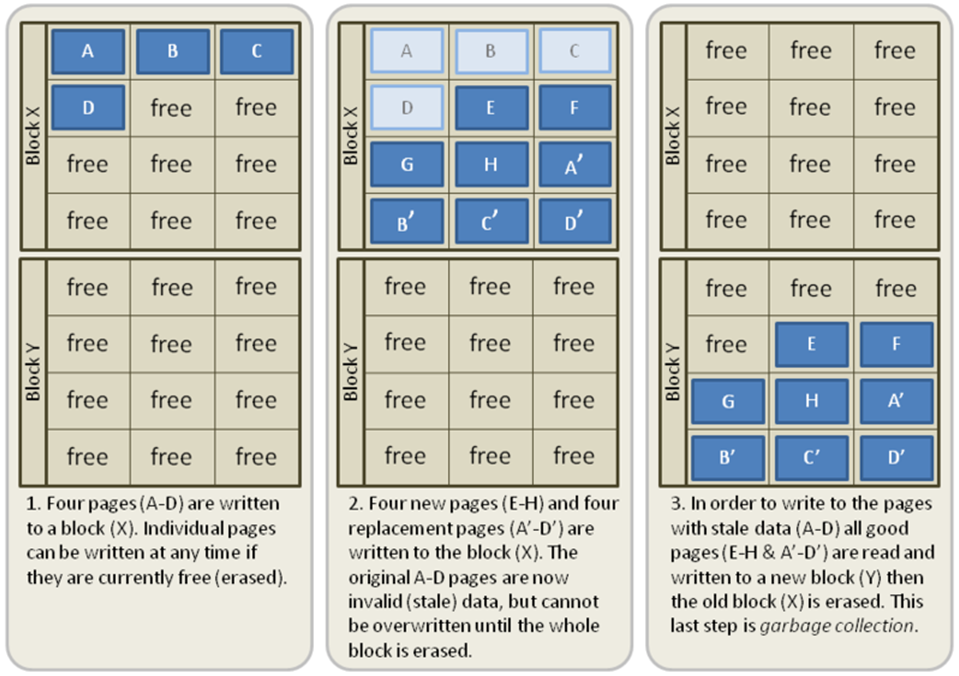
I m attaching the diagram above for a visual and clear explanation.
So we have seen SSD wins in the case of reading and writing in comparison to HDD. Lets see where its performance hurts.
Suppose we have our beautiful table numbers_table and the table having a B-Tree index on an attribute number and having an SSD storage. If you wanna read about indexing and B-trees you can check my previous blog. The blog link:- https://databasenoob.wixsite.com/databasenoobs/post/indexing-in-databases
As we know whenever we insert any new value in the table the B-Tree index data structure has its references and keeps rebalancing itself if required so our reading operation works faster.
Just imagine we are using SSD and we are concurrently inserting the value into then number attribute in the table numbers_table the index gonna keep rebalancing itself i.e.; the root node can be child node after rebalancing the leaf node can be root after rebalancing and so on
The rebalancing part gonna hurts SSD very badly because in each insertion B- Tree gonna rebalance itself and for rebalancing its needs to perform an update process.
As we know the update process in SSD requires two operations one is writing to a new page and another one is garbage collections.
As the insertion operations increases in the table the rebalance and update operation gonna increase in SSD.
Now the question comes so it means we should not use indexes in case of SSD storage? No, we can use but we need to make a proper indexing method (Let me know in the comments if you wanna learn about the same)
The second question arises will it not be hurtful to HDD if we follow the same steps above? Yes, it will impact the HDD but not that much because in the case of HDD you just need to overwrite the value not to do garbage collection or to write into a new page.
That's all for this blog if you find anything missing or wrong feel free to add it into the comments section will love to read your feedbacks!
Stay Safe! Keep Learning!


The deeper you go makes your articles unique.Please also tell about how the metadata are managed while insertion.
Keep up the good work Rohit Congratulations👏