Untold Story of Connection Pooling..!
- Rohit Sharma

- Jul 17, 2022
- 4 min read
Hello Folks,
After a long time, we are back with another DB concept: connection pooling!
First, let's understand the meaning of connection in DB and why even we require connection pooling?
Creating Connection
As we know, to create a connection with DB and fetch the data from the same, we will require a connection from our backend framework to DB. We mainly simply use ORM or any library to do so. Let me share with you an example
(Note:- We will be using Node.js run time,Express.js framework, Pg Library, and PostgreSQL DB for further tutorial )
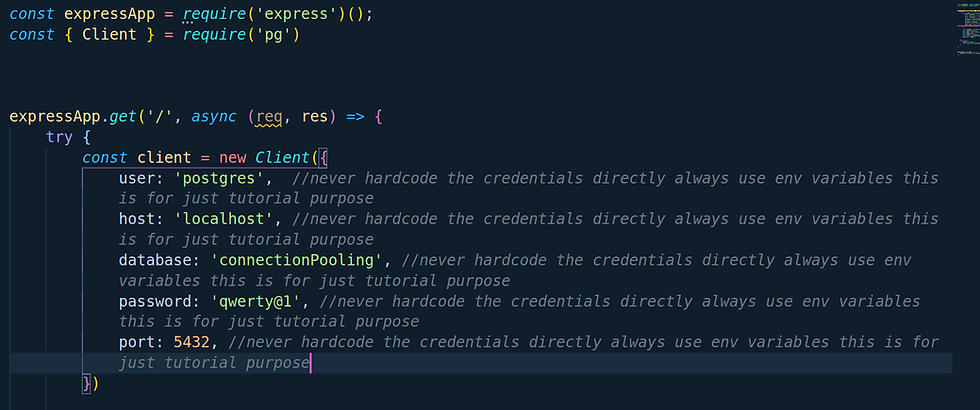
The above is just a simple example to create a DB connection via the PG module. So what actually happens when we do so with our DB when we try to create a connection?
The following things happen:-
A TCP connection gets established between your backend service and PostgreSQL DB
In order to pass data, a 3-Way Handshake happens between the backend service and PostgreSQL which can take up to 20-30 milliseconds depending upon the network
Once the above two processes are completed and we are good to go for the execution of requests. You must be wondering yes, man this is how it works what's new here?
I do agree this is how things work and everything is fine but let's understand the limitation of PostgreSQL when you gonna receive the concurrent requests from your web or app application.
As we discussed above each time we want to connect our backend service to DB it creates a TCP connection with our PostgreSQL server and if we are connected via SSL(means via HTTPS) then it's gonna take more time for exchanging keys and certificates via TLS
There is always a limit in PostgreSQL for having multiple clients at a time. If you cross that number you gonna blow up things
PostgreSQL can process one query at a time in FIFO(First In First Out) fashion. If you are using a single connected client for all your queries in your application then it's gonna queue your queries execution and gonna execute one by one which is gonna ultimately slow your whole application performance.
So how we can resolve and overcome these issues? Let's call our superhero connection pooling!
Let's see what features it gives us
In this instead of creating a connection on each request connection pooling gonna create N number of connections pre-prepared(defined by the max value)
In this case, if a client gets connected then we don't gonna do all these jazz-like establish a TCP connection, SSL, and all these stuff, we just gonna use the connection which is already created in the above point.
For Example, let's say we created a pool of 20 connections and now a client is being connected. So instead of creating a new connection we gonna give that client for created 20 connections. The remaining connection will be 19
Let's say another client gets connected the same above will be followed and the remaining connection will be 18 and so on
But here comes the case in our mind like what will happen if the first client who is being connected is not doing anything sitting idle for an hour and he is occupying the place of another potential client. How we can resolve this?
Well, don't worry about that we got plenty of options when we create a pool. Lets's take a example of PG module library. Following are below:-
connectionTimeoutMillis :- number of milliseconds to wait before timing out when connecting a new client by default this is 0 which means no timeout
idleTimeoutMillis:- number of milliseconds a client must sit idle in the pool and not be checked out before it is disconnected from the backend and discarded default is 10000 (10 seconds) - set to 0 to disable auto-disconnection of idle clients
max:- maximum number of clients the pool should contain by default this is set to 10.
allowExitOnIdle:- Default behavior is the pool will keep clients open & connected to the backend until idleTimeoutMillis expire for each client and node will maintain a ref to the socket on the client, keeping the event loop alive until all clients are closed after being idle or the pool is manually shutdown with `pool.end()`. Setting `allowExitOnIdle: true` in the config will allow the node event loop to exit as soon as all clients in the pool are idle, even if their socket is still open to the postgres server.
Reference link:- https://node-postgres.com/api/pool
Enough talk now let's see is this really helping us or not?
Let's create a sample project and install required dependecies
(Note:- All these things we will be pushing on public github repo you can take pull and check all the codes )
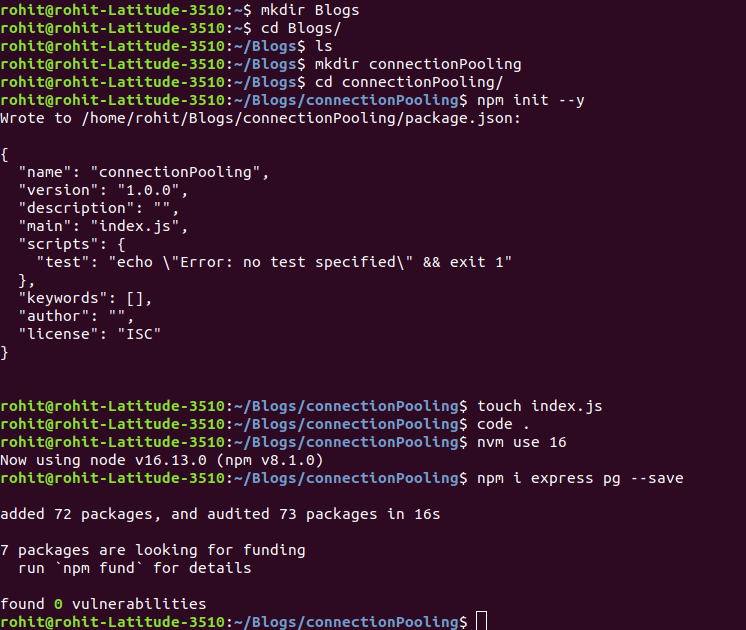
We are done now lets create a database,table and add some data to the table
Database Creation

Table Creation

Script to add the data in table users

Now lets create an API using our legacy connection

Now Lets create an API using pool connection

Lets create a script for creating some loads on both native connection and pool connection and check performace we will be considering 65 users simultanesouly consuming the API
For native connection load test script (Before running this script make sure you running the native connection file by using command " node withoutpool.js")

For pool connection load test script (Before running this script make sure you running the native connection file by using command " node withpool.js")

We have setuped everything now let's run all the scripts and check if its make any difference

Voila!
Here's the repo link:- https://github.com/rohitdexter/connectionPooling
If you didn't get any jargons in provided blog or you want blog on any other topic please do let me in comments.
Stay Safe! Keep Coding!


Comments